
Appointments
An appointment booking system that knows who's free, for what, and where
Your customers book on their own, at any hour, the service they want with the person they choose. And they only see slots that are really free: with someone who does that service and the room or bay it needs.


What an appointment booking system gets you
They book on their own
No calls or messages: they pick the service, person, day and time on their phone.
No double bookings
Every time slot checks the person, their hours and the room it needs.
Payment if you want it
A deposit, a percentage or the full price per service, or payment at your business.
Notices that go out on their own
Confirmation and reminder by email, and by WhatsApp if the customer asks.
Who
Customers choose the person, or whoever's free
Each member of your team has their own services and hours, and can have their own price and length. When booking, customers choose a member of staff or “Anyone”, and only see people who do that service.
- They choose on cards with each person's name and initials.
- If only one person does that service, there's nothing to choose.
- If someone takes longer over a colour or charges more as a senior stylist, customers see it when they book.

What they book
One service or several in a row, in the same appointment
Customers can book up to five services in a row, like a haircut and a manicure, and choose who does each one.

Your categories
Group your services into categories and order them as you like, so they're quick to find.
Priced, free or on request
Each service shows its price, is free or is priced on request, with how long it takes. Anything on request gets its amount once you agree it with the customer, and they receive it by email to pay.
What can follow what
You decide which services can be booked one after another.
Per-person prices
For appointments and visits you can charge per person: customers say how many are coming, within your limits, and the total follows.
No overlaps
Only times that are really free are offered
At eleven someone's free, but they don't do that service. Or the only room is taken. Or the massage lasts an hour and another customer comes in at twelve. Here, that slot isn't offered.
- Weekly hours with several blocks a day, time off for each person and days the business is closed.
- Your resources by name: room, bay, chair or machine. Three therapists and two rooms aren't three appointments at once.
- If two customers ask for the same time at once, only one gets it.

How customers book
Booking an appointment online, in four steps and with no account
Customers start from your website, your link or a QR code, and only need to give a name and email, plus a phone number if they wish.
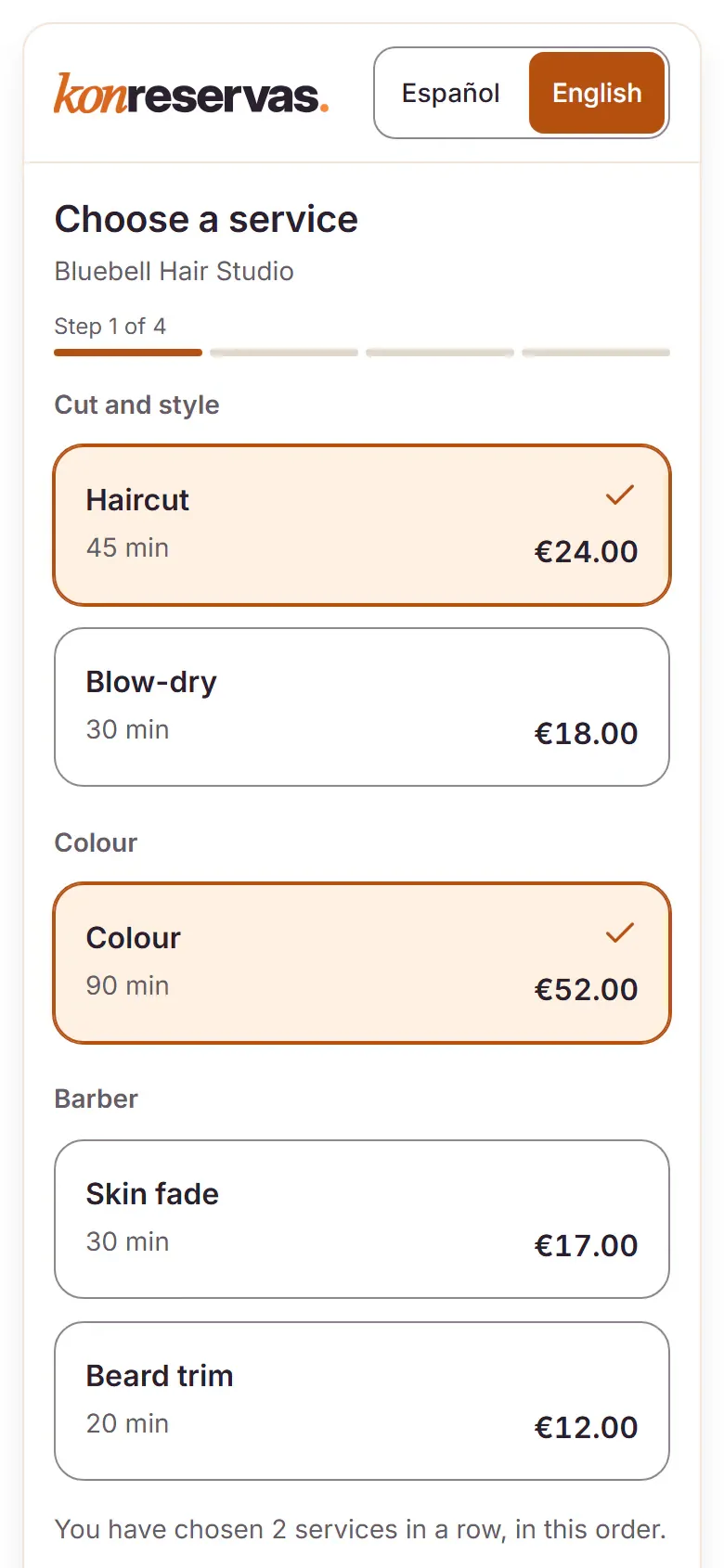
Choose the service
One or several in a row, within your categories.
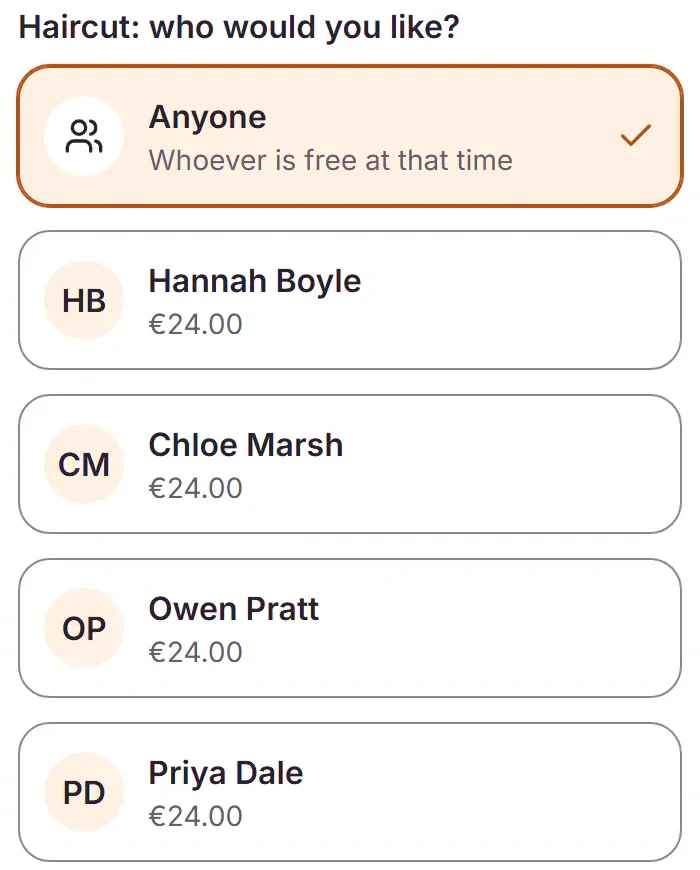
Choose who
A particular person or whoever's free at that time.
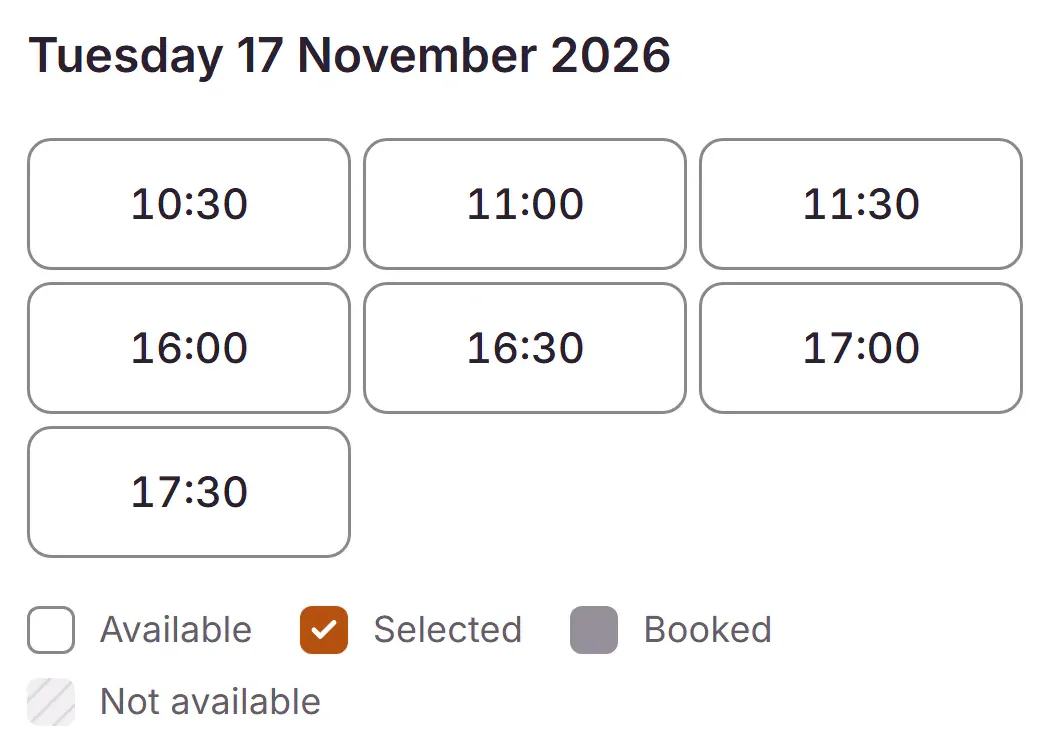
Choose the day and time
They only see the slots that work for that service and that person.
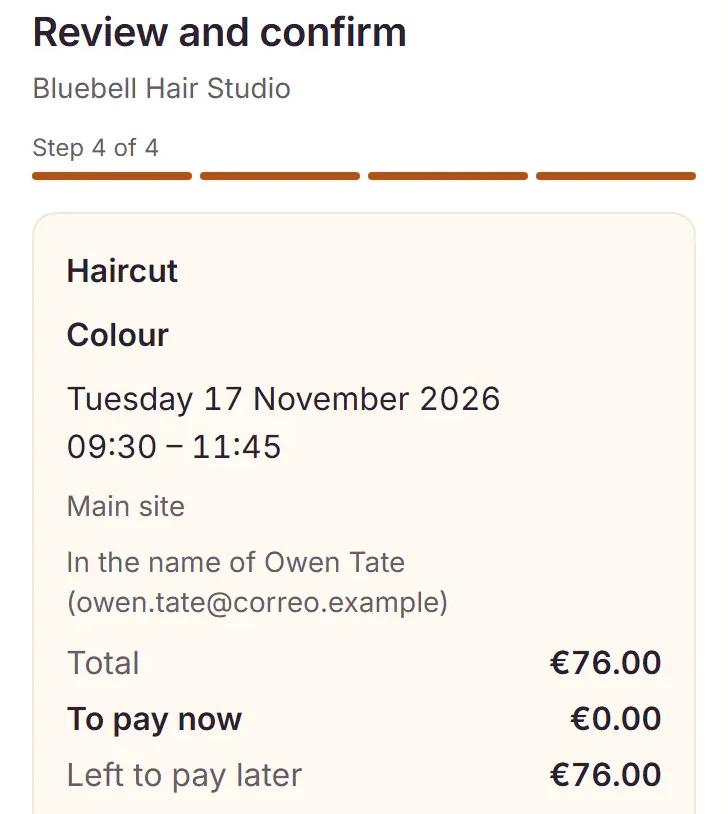
Review and confirm
They leave their details, answer your questions and, if you've set your terms, read them before confirming.


Your rules
Each appointment is confirmed the way you want
Let bookings go straight through or review the ones you choose first. And set your cancellation terms once.
- For the services you choose, the booking is a request: the slot is held, nothing is charged in the meantime, and you accept or decline it. If you don't reply in time, it's released and both sides are told.
- If a service doesn't ask for advance payment, the booking is confirmed straight away.
- If it asks for a deposit or the full price, the slot is held for the time you set and confirmed when the payment arrives; if it isn't paid in time, it's free again.
- Your cancellation terms, per service or for the whole business, or one of the four templates: none applies until you choose it.


After booking
Reminders, changes and customer records, without chasing anyone
When an appointment comes in, the notices go out on their own and you just check the diary.
Confirmation and reminder
By email, in each customer's language and with the days or hours' notice you choose, for changes and cancellations too.
WhatsApp, if they ask
If customers tick the box when booking, they also get them on WhatsApp.
Changes without calling you
With the link in their email they manage their booking without an account, under your policy; without one, they ask to cancel and you review it.
In their calendar
When they finish booking they can download a calendar file, and the confirmation email has one too.
If they don't come
Once an appointment has started, you can mark it as a no-show.
Their record
Every customer has a record with their contact details, their bookings and an internal note only your team sees.
Regular customers
The every-Tuesday customer, set up in one go
From the dashboard you create a series of appointments for a customer with an email address, home visits included, and see beforehand which dates clash.
- You schedule it up to an end date or for a number of times.
- If a date clashes, you choose between creating the rest or creating none.
- You can change or cancel one date or the whole series, and every appointment has its reminder.

In the dashboard
Appointments made by phone, in the same diary
Log the bookings you get by phone or in person in the dashboard: find the customer in your list or add them without leaving the booking.
- They go through the same checks: if there's no slot, it doesn't go in.
- You can log an appointment with just a name; without an email, the customer gets no notices.
- A diary by day, week and month, with a filter by person and each booking's status.
- From an appointment's details you move it to another time, mark it as completed or note that it was paid at your premises.


What you ask
Ask what you need to know before the appointment
Name and email are all a booking needs, with a phone number optional. Any other question is your choice.

Your own questions
Text, number, list or tick box, required or not, on all your services or just some: the number plate, the pet or the topic.
The customer's note
Whoever books can leave you a note, if you've turned it on.
Internal notes
Your team adds an internal note to each appointment, which the customer doesn't see.
Before and after
From a notebook and messages to an appointment booking system
What changes in your day when appointments book themselves.
| Without online booking | With Konreservas |
|---|---|
| You answer calls and messages to give out times. | Customers book on their own, at any hour. |
| You check who's free and whether a room is left. | Only possible slots are offered. |
| You remind people one by one the day before. | The reminder goes out on its own, by email or WhatsApp. |
| People call you to change or cancel. | Customers manage it with their link, under your policy. |
| You ask for the deposit by bank transfer and note it down. | The deposit is paid when they book and stays on the booking. |
Where it fits
Businesses that work by appointment
It works for any business that sees one person for a set time. Here are a few sectors, each with its own demo.





- Try the demo: Hair salonBook at the example salon, pick who you'd like and check the free slots it offers.


Frequently asked questions
Do customers have to sign up before booking an appointment?
No sign-up at all. They leave a name and email, and a phone number only if they choose to.
Can I have services that only one person does?
Yes. Each person has their own services, and customers are only offered people who do that service.
What if a day has no slots left?
With the waiting list on for that service, customers sign up for that day, morning or afternoon, and with a particular professional if they like. If an appointment is cancelled or moved, the first person on the list gets an email, and a WhatsApp if they asked for one, with a link to book the slot before it passes to the next.
How much does it cost?
One monthly fee for your appointment calendar, in euros, VAT included and with no minimum term: Essential, €19; Team, €49; Business, €79. Every plan books appointments the same way, and your customer books online with the professional they prefer or whoever is available; what changes is how many professionals with a calendar fit in, and Team and Business add free migration of your customers and upcoming appointments from the software you use now, wherever possible. Every plan includes the calendar, online booking, payments and reminders. Team and Business add winning back customers, reports per professional with targets and team commissions; Google reviews come included on Team and Business, and cost €10 a month, VAT included, on Essential. If you take the appointment deposit with integrated payments, which switch on with one button: 0.5% on each payment you take, plus Stripe's fees. Security deposits you ask your customers for carry no Konreservas fee. See Stripe fees. If you take the deposit through your own Stripe account, your bank's virtual POS via Redsys, bank transfer or at your business, Konreservas charges no commission per booking on any appointment; whatever that provider charges is separate. Compare the plans on the pricing page.
Can I take payment in advance?
Yes, per service: a fixed deposit, a percentage or the full price. We explain it in payments and deposits.
Does it sync with Google Calendar?
Only from Konreservas to your calendar: with the private link in your dashboard you see your appointments in Google Calendar, but you create and change them in Konreservas. Customers, for their part, save their appointment with the calendar file.
Does it work for my clinic or practice?
It handles your practice's appointments and doesn't replace your clinical software. See the health page.
Your appointment diary, open at any hour
Start with the services you already offer and the people who already do them.